# WorkManager multi-process for libraries
> Cover image: *Beacons* [by Romain Guy](https://www.flickr.com/photos/romainguy/31390069837/).
# Summary
This blog shows how LeakCanary builds on top of WorkManager to run work in a separate process, while also not messing with the configuration of the hosting app. WorkManager is an amazing library, but using it to schedule remote process work as a library has several gotchas.
# Intro
For LeakCanary 2.8 I'm [rewriting how the heap analysis is performed](https://github.com/square/leakcanary/pull/2237/) to stop relying on a foreground service and use WorkManager instead, because [Android 12 happened](https://developer.android.com/guide/components/foreground-services#background-start-restrictions). To limit memory pressure on the hosting app, LeakCanary supports running the analysis in a separate process. Let's see how this all fits together!

I need to support the following behavior:
- If the app using my library depends on WorkManager and WorkManager multi process, schedule the work to run in a separate process.
- If the app using my library depends on just WorkManager, schedule the work with WorkManager.
- Otherwise use a simple background thread. This isn't ideal but I'm ok with losing the work on process death.
# Optional WorkManager
Libraries should [avoid forcing dependencies](https://twitter.com/Piwai/status/1474410599945805832) down on their consumers when possible. Let's look at how we can do that for WorkManager.
First, I add the WorkManager dependencies to our compile classpath as `compileOnly` so that I can write code against the WorkManager APIs, without having those dependencies appear in the published `pom.xml` on Maven Central
```groovy
dependencies {
// Optional dependencies
// Note: using the Java artifact because the Kotlin one bundles coroutines.
compileOnly 'androidx.work:work-runtime:2.7.0'
compileOnly 'androidx.work:work-multiprocess:2.7.0'
}
```
Then I just need a runtime check for the `WorkManager` class:
```kotlin
val workManagerInClasspath by lazy {
try {
Class.forName("androidx.work.WorkManager")
true
} catch (ignored: Throwable) {
false
}
}
```
# Thread vs WorkManager
Here's a simple implementation that falls back on a background thread if WorkManager isn't available:
```kotlin
class MyWorkScheduler(private val application: Application) {
val workManagerInClasspath = // ...
val backgroundHandler by lazy {
val handlerThread = HandlerThread("Background worker thread")
handlerThread.start()
Handler(handlerThread.looper)
}
fun enqueueWork() {
if (workManagerInClasspath) {
enqueueOnWorkManager()
} else {
enqueueOnBackgroundThread()
}
}
private fun enqueueOnWorkManager() {
val request = OneTimeWorkRequest.Builder(MyWorker::class.java)
.build()
WorkManager.getInstance(application).enqueue(request)
}
private fun enqueueOnBackgroundThread() {
backgroundHandler.post {
TODO("perform the work")
}
}
}
class MyWorker(
appContext: Context,
workerParams: WorkerParameters
) : Worker(appContext, workerParams) {
override fun doWork(): Result {
TODO("perform the work")
return Result.success()
}
}
```
So far we have fairly standard WorkManager code. I'm intentionally staying away from setting up a WorkManager [Configuration](https://developer.android.com/reference/androidx/work/Configuration) as that can only be set once, and I don't want to step on the toes of the developers using WorkManager for their own purposes.
WorkManager 2.7.0 introduces the concept of [expedited work](https://developer.android.com/topic/libraries/architecture/workmanager/how-to/define-work#expedited), introduced for Android 12 as an alternative to the (now crashing) foreground services. Ideally I want to leverage that new API... but I don't want to force dependency upgrades, so let's add another runtime check:
```kotlin
class MyWorkScheduler {
// ...
// setExpedited() requires WorkManager 2.7.0+
private val workManagerSupportsExpeditedRequests by lazy {
try {
Class.forName("androidx.work.OutOfQuotaPolicy")
true
} catch (ignored: Throwable) {
false
}
}
private fun enqueueOnWorkManager() {
val request = OneTimeWorkRequest.Builder(MyWorker::class.java).apply {
if (workManagerSupportsExpeditedRequests) {
setExpedited(OutOfQuotaPolicy.RUN_AS_NON_EXPEDITED_WORK_REQUEST)
}
}.build()
WorkManager.getInstance(application).enqueue(request)
}
}
```
> Note: the `OneTimeWorkRequest.Builder` API is unusual: there's no symmetry, i.e. you can't undo state changes (unset expedited, remove a tag...)
# Multi process
I want to schedule work from the main app process (e.g. `com.example`), and that work should execute in a separate process (e.g. `com.example:mywork`).
## RemoteWorkerService
First, I register a [RemoteWorkerService](https://developer.android.com/reference/androidx/work/multiprocess/RemoteWorkerService) that will run in the `:mywork` process:
```kotlin
class MyRemoteWorkerService : RemoteWorkerService()
```
> Note: I'm registering a subclass of `RemoteWorkerService` because component names are unique per app, so this avoids conflicts if the consuming app already registered a `RemoteWorkerService` in its manifest. The `RemoteWorkerService` class should probably have been abstract.
```xml
```
## RemoteWorker
Since my remote process uses the same APK, my remote worker should ideally be fairly identical to my previous non remote worker, for example:
```
class MyRemoteWorker(
appContext: Context,
workerParams: WorkerParameters
) : RemoteWorker(appContext, workerParams) {
override fun doWork(): Result {
TODO("perform the work")
return Result.success()
}
}
```
Unfortunately, the `RemoteWorker` class doesn't exist, we only have [RemoteListenableWorker](https://developer.android.com/reference/androidx/work/multiprocess/RemoteListenableWorker). That's ok though, same as how `Worker` extends `ListenableWorker`, I can create a `RemoteWorker` that extends `RemoteListenableWorker`:
```kotlin
abstract class RemoteWorker(
context: Context,
workerParams: WorkerParameters
) : RemoteListenableWorker(context, workerParams) {
abstract fun doWork(): Result
override fun startRemoteWork(): ListenableFuture {
val future = SettableFuture.create()
backgroundExecutor.execute {
try {
val result = doWork()
future.set(result)
} catch (throwable: Throwable) {
future.setException(throwable)
}
}
return future
}
}
```
> Note: I'm not sure why `Worker` is provided but `RemoteWorker` isn't. That might be because blocking APIs tend to lead to implementations that don't support cancellation (as is the case here). The other thing is, there's so little difference between the remote and non remote implementations, I wish I could define a single worker class and decide where to run it when I schedule the work.
## Scheduling the work
Scheduling remote work is almost identical, except that we need to provide the component name for the remote service as part of the work request (these arguments are parsed by `RemoteListenableWorker`):
```kotlin
class MyWorkScheduler {
// ...
private val remoteWorkerServiceInClasspath by lazy {
try {
Class.forName("androidx.work.multiprocess.RemoteWorkerService")
true
} catch (ignored: Throwable) {
false
}
}
fun enqueueWork() {
if (remoteWorkerServiceInClasspath) {
enqueueOnWorkManagerRemote()
} else if (workManagerInClasspath) {
enqueueOnWorkManager()
} else {
enqueueOnBackgroundThread()
}
}
private fun enqueueOnWorkManagerRemote() {
val request = OneTimeWorkRequest.Builder(MyRemoteWorker::class.java).apply {
putString(ARGUMENT_PACKAGE_NAME, application.packageName)
putString(ARGUMENT_CLASS_NAME, "com.example.MyRemoteWorkerService")
if (workManagerSupportsExpeditedRequests) {
setExpedited(OutOfQuotaPolicy.RUN_AS_NON_EXPEDITED_WORK_REQUEST)
}
}.build()
WorkManager.getInstance(application).enqueue(request)
}
}
```
# Crash
At this point, I feel pretty good about the whole thing. This should work! Let's run the code:
```
java.lang.IllegalStateException: WorkManager is not initialized properly.
You have explicitly disabled WorkManagerInitializer in your manifest,
have not manually called WorkManager#initialize at this point, and your
Application does not implement Configuration.Provider.
at androidx.work.impl.WorkManagerImpl.getInstance(WorkManagerImpl.java:158)
at androidx.work.multiprocess.ListenableWorkerImpl.(ListenableWorkerImpl.java:72)
at androidx.work.multiprocess.RemoteWorkerService.onCreate(RemoteWorkerService.java:37)
at android.app.ActivityThread.handleCreateService(ActivityThread.java:4487)
at android.app.ActivityThread.access$1700(ActivityThread.java:247)
at android.app.ActivityThread$H.handleMessage(ActivityThread.java:2072)
at android.os.Handler.dispatchMessage(Handler.java:106)
at android.os.Looper.loopOnce(Looper.java:201)
at android.os.Looper.loop(Looper.java:288)
at android.app.ActivityThread.main(ActivityThread.java:7839)
at java.lang.reflect.Method.invoke(Native Method)
at com.android.internal.os.RuntimeInit$MethodAndArgsCaller.run(RuntimeInit.java:548)
at com.android.internal.os.ZygoteInit.main(ZygoteInit.java:1003)
```
The exception message is confusing at first. I didn't do anything to WorkManager's initialization, why is it complaining?
See, that's the thing: when `RemoteWorkerService.onCreate()` runs in the `com.example:mywork` process, WorkManager needs to be already initialized. In the main process, that's automatically done by the Androidx startup library. However, the startup initializers don't run in other processes!
As a library developer, I don't have access to the `Application` class, so I can't make it implement [Configuration.Provider](https://developer.android.com/topic/libraries/architecture/workmanager/advanced/custom-configuration) or have it call `WorkManager.initialize()`.
I can find another way to init WorkManager, however WorkManager initialization can only happen once, so if the developer set up custom WorkManager initialization then my init will conflict with their init. Unfortunately, there are no `WorkManager.isInitialized()` or `WorkManager.getInstanceAndInitIfNotDoneYet()` APIs.
Sometimes you just have to follow the [desire path](https://en.wikipedia.org/wiki/Desire_path)...
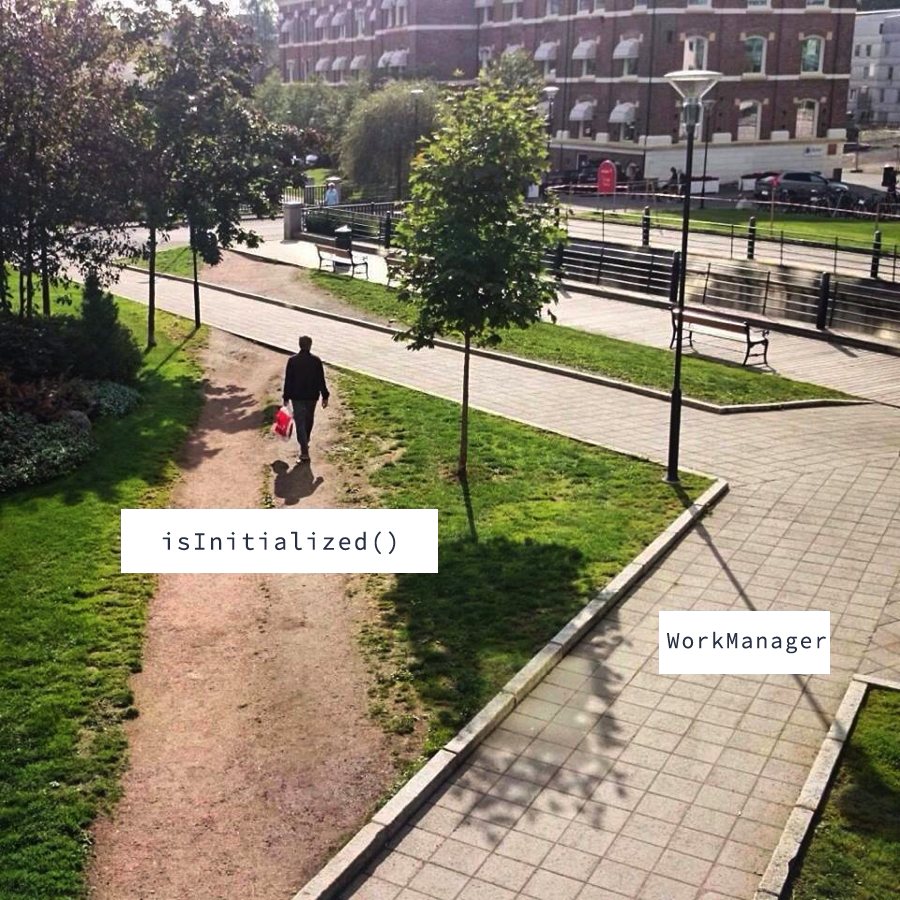
Let's create the API we need:
```kotlin
class MyRemoteWorkerService : RemoteWorkerService() {
override fun onCreate() {
if (!isWorkManagerInitialized()) {
WorkManager.initialize(
applicationContext,
Configuration.Builder().build()
)
}
super.onCreate()
}
private fun isWorkManagerInitialized() = try {
WorkManager.getInstance(applicationContext)
true
} catch (ignored: Throwable) {
false
}
}
```
# Rescheduling
At this point, it works! However, I quickly notice that when I schedule remote work, the `:mywork` process starts, the work starts, then the work is immediately canceled, then it's rescheduled and eventually runs fine. That's weird.
After debugging the WorkManager library code in 2 parallel processes (😰) I eventually figure out that when WorkManager is initialized, it runs a [ForceStopRunnable](https://cs.android.com/androidx/platform/frameworks/support/+/androidx-main:work/work-runtime/src/main/java/androidx/work/impl/utils/ForceStopRunnable.java) which cancels and then reschedules all the work on init.
One way to prevent ForceStopRunnable from running is to set Configuration.Builder.setDefaultProcessName to the main app process name. Unfortunately that's not ideal: if the developer did set the work manager configuration in their application class and didn't set `setDefaultProcessName`, then `ForceStopRunnable` will run and I can't do anything to change that.
So we can only provide a fix for the non initialized case:
```kotlin
class MyRemoteWorkerService : RemoteWorkerService() {
override fun onCreate() {
if (!isWorkManagerInitialized()) {
WorkManager.initialize(
applicationContext,
Configuration.Builder()
.setDefaultProcessName(applicationContext.packageName)
.build()
)
} else {
// If the developer didn't set setDefaultProcessName in the
// Configuration.Builder then the work will be rescheduled once
// when :mywork starts and there's nothing we can do about it.
}
super.onCreate()
}
// ...
}
```
# An ever cooler hack
**Edit: after thinking through this once more, I realized there was another way I could get this working, and it's probably a better hack. Here goes.**
WorkManager will automatically initialize itself on first use if the application `Context` implements `Configuration.Provider`. But there's nothing about this contract that says the `Application` class has to be the application `Context`. That's one of the [most annoying parts](https://stackoverflow.com/a/6760019/703646) of the `Context` API, but for once, we can benefit from it!
The idea is to have `RemoteWorkerService.getApplicationContext()` return a fake app context that implements `Configuration.Provider` and provides the configuration we want:
```kotlin
class MyRemoteWorkerService : RemoteWorkerService() {
class FakeAppContextConfigurationProvider(base: Context)
: ContextWrapper(base), Configuration.Provider {
// service.applicationContext.applicationContext still returns this
override fun getApplicationContext() = this
override fun getWorkManagerConfiguration() = Configuration.Builder()
.setDefaultProcessName(packageName)
.build()
}
private val fakeAppContext by lazy {
FakeAppContextConfigurationProvider(super.getApplicationContext())
}
override fun getApplicationContext(): Context {
return fakeAppContext
}
}
```
This is even cooler than the previous hack because, whether or not the developer implemented `Configuration.Builder` in their application class, we get to decide what configuration we want for our own process. This only way around it is if they called `WorkManager.initialize` directly.
# Conclusion
Getting WorkManager multi-process to work well in a library isn't straightforward and currently requires a few hacks, but that's not surprising: Android has historically been fairly bad at building APIs with libraries in mind, and having a single Application class has always been a source of bugs for multi process apps. The AndroidX WorkManager and Startup libraries are going in the right direction!
> Huge thanks to [Rahul Ravikumar](https://twitter.com/tikurahul) for his help with figuring out WorkManager multi-process. He's already working on [addressing some of these issues](https://android-review.googlesource.com/c/platform/frameworks/support/+/1934672)!